 Get Coverfetch
How to add book covers in Notion (3 ways)
To show book covers in Notion, give each book page a cover image, then set your gallery view's Card preview to Page cover. The quickest way is to have the cover added for you when you add the book, which is what I built Coverfetch for. You can also link to Open Library's free cover images by ISBN, or upload each cover by hand. Here are all three, and the settings that stop covers looking cropped.
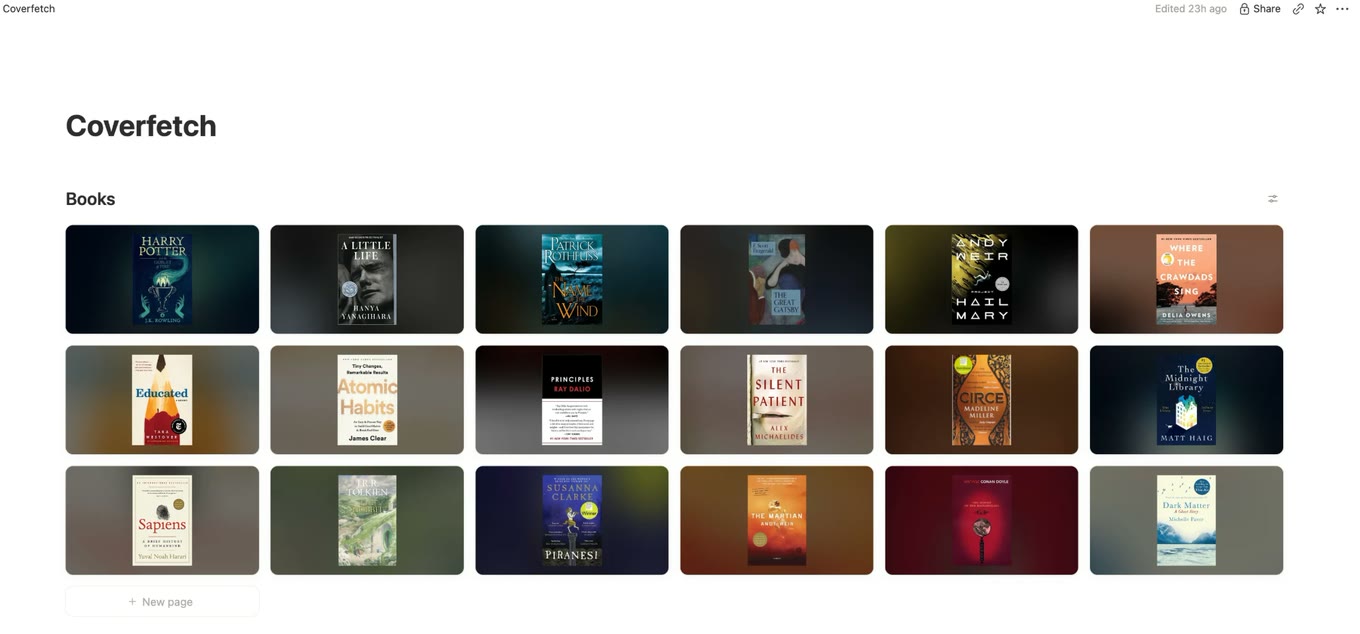
Page cover or a Files & media property?
There are two places a cover can live:
- The page cover (the banner at the top of each book page). Notion's gallery can use it directly, and it also makes the book page itself look nice when you open it. This is what I use.
- A Files & media property called something like Cover. It works too: set the gallery's card preview to that property instead. Handy if you want to keep the page banner for something else.
Pick one and stick with it, because the gallery can only show one source.
Way 1: Let Coverfetch add it when you add the book
This is the reason I built Coverfetch. In your Notion book database, type the title (or the ISBN) in a new row and end it with ;:
The Hobbit;A few seconds later the page has its cover, plus the authors, genres, page count, publisher, published date, ISBN and a short summary in whichever of those properties your database has. You never leave Notion or go looking for an image.
; in Notion. Everything else fills in by itself.It only sets a cover when the page doesn't have one yet, and it never overwrites properties you filled in yourself. If several books share a title, write Title by Author; to get the right one. Already have books without covers? Click into the title, add ; at the end, and it fills them in too.
Way 2: Link to Open Library's covers by ISBN
Open Library (part of the Internet Archive) serves cover images by ISBN at a predictable address:
https://covers.openlibrary.org/b/isbn/9780141439518-L.jpgSwap in your book's ISBN, keep -L for the large size (-M is medium), and paste that address into Change cover → Link. No download needed.
Two things to know:
- Not every ISBN has a cover there. If you get a blank or tiny image, try the book's other ISBN (the 10-digit or 13-digit one) or a different edition.
- The cover matches that ISBN's edition, so make sure the ISBN is for the edition you actually own.
Way 3: Add the cover by hand
- Open the book's page.
- Hover over the title and click Add cover.
- Click Change cover → Upload to use an image file, or Link to paste an image URL.
- Use Reposition if the important part of the cover is cut off on the page banner.
This is fine for a handful of books. For a whole shelf it gets old quickly: find the book, find a decent cover image, copy, paste, repeat.
Which way should you use?
| Coverfetch | Open Library link | By hand | |
|---|---|---|---|
| Cost | $49 once | Free | Free |
| What you type | Title or ISBN + ; | A URL with the ISBN | Nothing; you find and upload the image |
| Also fills author, pages, summary… | Yes | No | No |
| Best for | A whole shelf, and every book you add later | A few books you have ISBNs for | One or two books, or a cover you made yourself |
Make covers look good in gallery view
Open your gallery view's ⋯ → Layout and set:
- Card preview: Page cover (or your Files & media property).
- Fit image: on. Without it, Notion crops covers to fill the card and cuts off titles. With it, the whole cover shows, with space around it.
- Card size: Medium for a shelf, Large if you only show a few books.
- Properties: hide almost everything. Title alone, or Title and Authors, looks the cleanest.
FAQ
Why do my book covers look blurry in Notion?
The source image is small. Use a larger version: on Open Library, use -L rather than -M or -S in the URL.
Why is part of the cover cut off in my gallery?
Fit image is off. Turn it on in the gallery's Layout settings.
Why does my gallery show text instead of covers?
The card preview is set to Page content. Change it to Page cover, or to the Files & media property you use for covers.
Can I use covers with Notion's free plan?
Yes. Page covers and gallery views both work on the free plan.
Building the whole tracker? Start with how to build a reading tracker in Notion, and see which properties a book database needs.
Fill your Notion reading list automatically
Type a book's title followed by ; in Notion and Coverfetch fills in the cover, author, genres, page count and summary.